It takes less than three seconds to generate a stunning landscape using tools like Midjourney or Leonardo AI, yet millions of users still produce chaotic, plastic-looking outputs. The gap between a beginner’s generic rendering and a hyper-realistic, agency-level asset isn’t defined by the platform being used. It entirely depends on the mathematical precision of the text prompt. This guide dismantles the conversational approach to prompting and provides the exact structural frameworks, lighting terminology, and negative constraints required to master image generation.
The Core Problem: Stop Talking to the AI
Most beginners interact with AI generators as if they were human designers. They use sentences like, “Please create a picture of a coffee cup sitting on a table, maybe make it look sad.”
Generative models do not process conversational filler. They process semantic tokens. Words like “please,” “create,” and “maybe” dilute the significance of the actual subject matter. Every additional word forces the attention mechanism to split its mathematical weights.
To achieve high fidelity, adopt a strict modular framework. Structure prompts logically by subject, medium, environment, lighting, and camera parameters.
Structure Example: Subject [Character/Object] + Setting [Location/Background] + Medium [Photography/Digital Art] + Lighting [Studio/Natural] + Technical Specs [Camera Angle/Resolution]
This modular synthesis ensures the engine allocates maximum processing power to the physical elements rather than attempting to render the concept of politeness. This creates predictable, replicable results. Tools like AI Photo Editor platforms often have built-in structural guides, but understanding the raw text syntax remains non-negotiable.
Photography Terminology Replaces Vagueness
If you want an output to look real, you must stop using the word “realistic.” The AI associates “realistic” heavily with generic, overly-smoothed 3D renders from its training data. Instead, describe the physical properties of an actual photograph.
Controlling Light
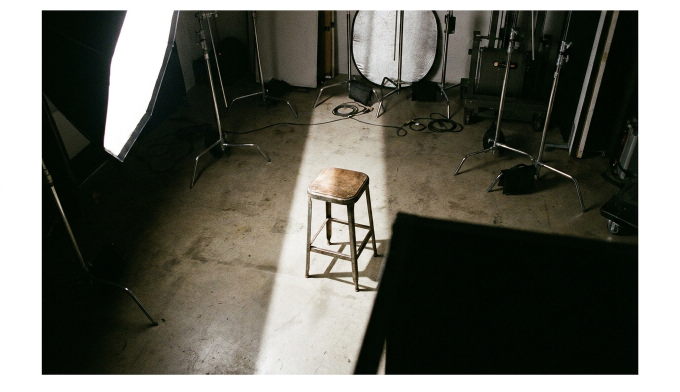
Lighting dictates the emotional resonance and three-dimensional depth of any visual. Stop asking for “good lighting”. Use industry-standard studio terminology to force the AI to simulate physical photon behavior.
· Rembrandt Lighting: Creates dramatic, high-contrast portraits characterized by a single triangle of light on the shadowed cheek.
· Split Lighting: Illuminates only exactly half of a subject’s face, leaving the rest in heavy shadow. Ideal for aggressive or mysterious profile portraits.
· Golden Hour: Forces long shadows and warm, diffused sunlight typical of late afternoon photography.
· Cinematic Catchlight: Specifically tells the engine to render the reflection of a light source inside the subject’s eyes, an absolute necessity for breaking the classic “dead AI stare”.
Camera Angles and Lens Physics
Composition defines how the audience engages with the subject. Standard AI outputs default to a boring, eye-level center crop. Command the artificial camera placement explicitly.
· Extreme Close-Up (Macro): Forces detailed rendering of textures, such as visible skin pores, dust motes, or fabric weaves.
· Low Angle Shot: Positions the camera below the subject, projecting power and imposing scale.
· Rule of Thirds: Instructs the model to position the primary focal point off-center, creating dynamic visual tension rather than a static passport photo alignment.
Advanced Parameter Weights and Multi-Prompts
Once you master the base vocabulary, the next step involves mathematically weighting individual concepts. Simply placing a word in a prompt does not guarantee it receives necessary visual focus.
In advanced latent diffusion models, syntax dictates priority. The earliest words in the string exert the heaviest graphical influence. A prompt starting with “A red apple” will bias the entire scene red, whereas placing “red apple” at the absolute end of a long paragraph might result in no apple appearing at all.
Utilizing Numerical Syntax Weights
Many engines support explicit mathematical weighting. Instead of hoping the model balances two conflicting ideas, you assign numerical values. For instance, blending two animals: A tiger::2 and an elephant::1. This explicitly informs the algorithmic engine that tiger characteristics must dominate the visual output by a factor of exactly two to one.
Break Semantic Blending
Semantic blending occurs when the AI confusedly mixes adjectives intended for different subjects within the same sentence. If you write, “A warrior in a red cape standing next to a blue car”, the model often bleeds the assigned colors, accidentally rendering a purple cape or a red car.
To mitigate this, structure the physical elements using hard isolation techniques. Separate the environment entirely from the subject using hard punctuation.
A warrior wearing a red cape. [Hard Break]. The warrior is standing in front of a blue car.
By forcing a hard structural barrier, the language processing model inside the image generator processes the subjects sequentially, drastically reducing unwanted color bleeding.
The Power of Negative Constraints
To control what the AI generates, you must be equally aggressive in defining what it is prohibited from rendering. Negative prompts act as a localized firewall against the model’s worst statistical habits.
Do not strictly state “bad quality.” The AI has no inherent understanding of aesthetic value judgements. Instead, you must diagnose exactly what usually goes wrong and build an explicit blacklist.
Prompt Component
Common Failures (Do Not Ignore)
Effective Negative Constraints to Use
Character Hands
The model attempts to merge multiple hand poses
extra fingers, fused fingers, mutated hands, six fingers
Photorealistic Faces
Plastic skin texture, excessive symmetrical smoothing
airbrushed, cartoon, CGI, smooth skin, symmetrical face
Backgrounds
Random text, floating unidentifiable objects
watermark, signature, text, floating objects, blurred background
Overall Image Fidelity
Pixelation, poor contrast
low resolution, jpeg artifacts, low contrast, oversaturated
This matrix solves essentially 90% of the anatomical hallucinations seen on major generator platforms like Midjourney.
Case Study: Rebuilding a Prompt
Consider a standard, weak beginner prompt: A cool cyber warrior in a city fighting.
This yields a generic, plastic-looking video game character in an undefined sci-fi background. The model has to wildly guess the lighting, the camera lens, and the specific aesthetic.
Let’s rebuild it using the precise framework we established.

image
Optimized Prompt: Medium shot, battle-damaged female cybernetic warrior, holding a plasma rifle, standing in a rain-soaked neon Tokyo alleyway. Cinematic rim lighting, volumetric fog, Kodak Portra 400, 35mm lens, f/1.8 depth of field, hyper-detailed metallic armor, visible rain droplets.
Every single segment does heavy aesthetic lifting. Medium shot establishes the frame constraints. Cinematic rim lighting pulls the character out from the dark background physically. Kodak Portra 400 dictates the exact color grading profile and film grain texture, instantly destroying the smooth artificial look.
If your team is generating assets for commercial use, standardizing this prompt structure is necessary. Whether utilizing cutting-edge image editors or running local open-source instances, precision heavily dictates outcome.
The Reality of Generation Iteration
Professional visual prompting is rarely a one-shot process. Assuming you will type a prompt perfectly on the first attempt is setting yourself up for failure. Expect a three-stage workflow:
1. The Core Generation: Test your subject and medium without heavy lighting or camera tags just to see if the engine understands the basic physical anatomy of what you are asking.
2. The Stylistic Pass: Once the anatomy is relatively correct, add the advanced lighting (Split lighting, Golden hour) and rendering tags (Kodak Portra 400, Unreal Engine 5).
3. The Parameter Lock: Fix the specific generation seed number. A random seed generates pure noise. Fixing the seed allows you to change exactly one word in the prompt and observe the isolated effect on the exact same composition.
If modifying a prompt isn’t yielding results, utilizing external AI upscaling and editing suites allows practitioners to manually repair artifacts via in-painting rather than infinitely rerolling prompts and burning token generation credits.
Frequently Asked Questions
How long should my AI image prompt be? The ideal metric length is highly debated, but generally, 30 to 75 words provides enough specificity without overwhelming the attention mechanisms of most current generation models. Focus entirely on weighted keywords rather than paragraph length.
Why does adding “4k” or “8k” sometimes do nothing? Tags like “8k” are heavily represented in the training data alongside highly rendered images. They do not magically increase the actual pixel resolution of your output file. They simply bias the aesthetic toward high-detail digital art renderings rather than sketched or raw photography.
What is the defining difference between Midjourney and Leonardo AI syntax? Midjourney relies heavily on specific backend parameter tags added strictly to the end of the prompt (such as --ar 16:9 for aspect ratio or --stylize 250). Leonardo AI processes natural language structural inputs highly effectively and features built-in UI toggles for aspect ratios, often requiring far less pure code-like syntax strings.
How do I quickly make AI images look less artificial? Stop using words like “masterpiece” or “highly detailed.” Switch to raw photography terms. Introduce physical scene imperfections via your prompts: explicitly specify “film grain,” “motion blur,” “harsh flash photography,” or “natural asymmetrical lighting.”
Can I legally use specific artist names in my working prompts? Yes. Using names of famous painters or contemporary digital artists strongly points the mathematical model toward specific style weights. However, always be strictly aware of the ethical landscape and community copyright guidelines when generating commercial illustrations heavily based on the exact syntax weights of living artists.