AI Portrait Generator
Create a portrait from one clear photo. Compare facial features, expression, and age cues with the original before using it for a profile.
Create a Portrait from One Photo
Choose a clear input and make likeness the final check.
Start with One Clear Selfie
Use a recent, evenly lit image with visible facial features. This workflow accepts one selected photo rather than a multi-photo training set.
Keep a Reference for Likeness
Save the original and compare eyes, mouth, jawline, hairline, and age cues. An attractive portrait can still be an inaccurate representation.
Review Presentation
Check clothing, hair edges, background, and lighting for unwanted changes. Do not assume every generated detail is suitable for professional use.
Work in Your Browser
Upload one image and choose its aspect ratio. Guest allowance or account credits are required; processing time can vary.
Elevate Your Identity with
AI Portrait Generator
Use the examples to consider framing and presentation. Your result needs its own review for likeness, unwanted changes, and the requirements of its intended destination.
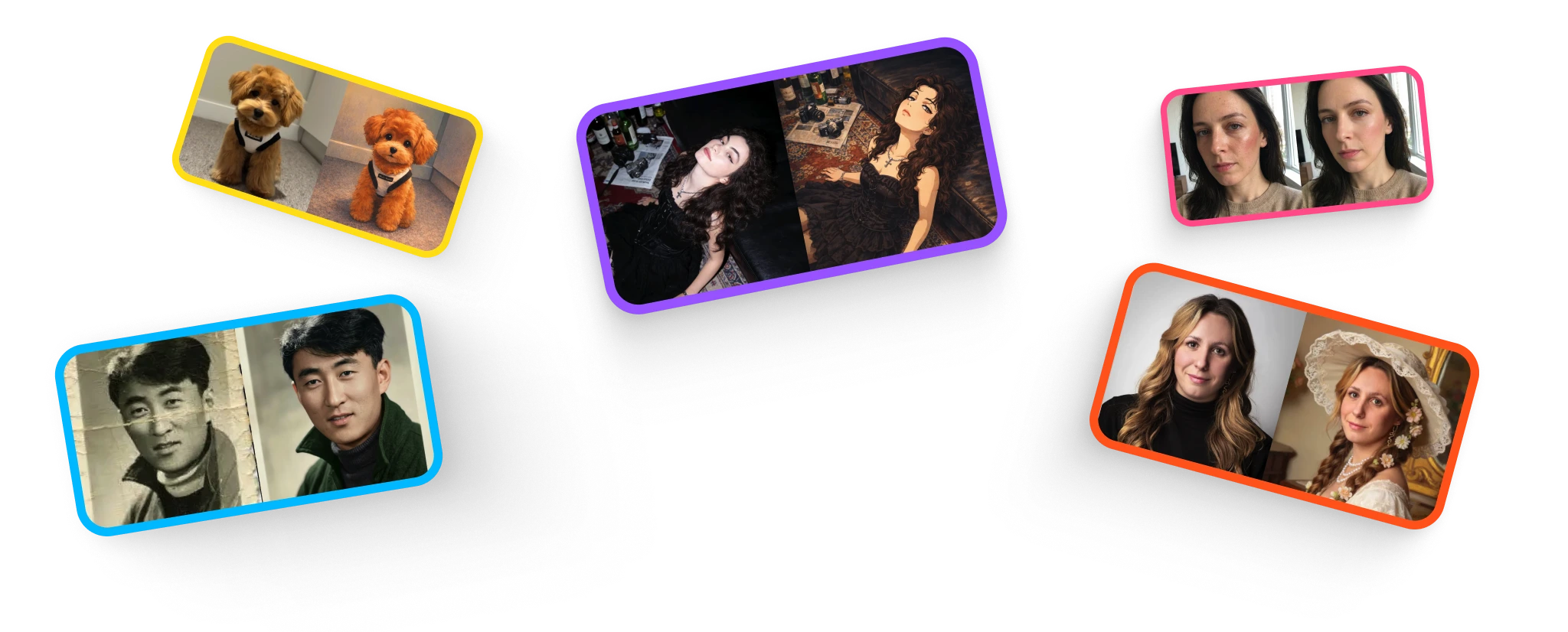

Check a Professional Portrait
Compare the face with your current appearance. Review collars, glasses, hair, and background edges before choosing an image for a profile.

Review a Profile Crop
Make sure the chosen crop keeps the face readable at small sizes. Check the destination’s image requirements before uploading.
Turn One Selfie into a Portrait Candidate
Upload, compare, and keep only a result that represents you.
Choose a Suitable Photo
Upload one JPG, PNG, or WebP image up to 10 MB. Avoid heavy filters, obstructed faces, and strong perspective distortion.
For a clearer starting image, learn how to prepare a suitable headshot photo.
Generate a Candidate
Choose an aspect ratio and let the portrait edit run. This tool has no manual face-preservation or wardrobe selector.
Review Before Downloading
Compare the result with the source at normal size and close up. Reject altered identifying features, then check the downloaded dimensions for your intended use.
What Makes a Portrait Usable?
Check identity, detail, and destination requirements.
Recognizable Features
Look at eye spacing, mouth shape, jawline, hairline, and identifying marks. Do not accept a smoother face at the cost of likeness.
Believable Lighting
Review the direction of shadows and the transition between face and background. Keep natural-looking contrast rather than clipped highlights.
Clothing and Background
Inspect seams, collars, jewelry, glasses, and background objects for invented or distorted details.
A Suitable Final Crop
Check the exported dimensions and how the face appears at the destination’s display size. Keep the original for future edits.
Choose the plan that fits how you create
Choose credits for restoration, portraits, retouching, illustration, and upscaling. Free access has usage limits.
Start with a one-time purchase
One-time universal credit packs
Use the same credits across every feature. Choose a pack once and spend credits whenever you need them.
One payment · No auto-renewal · Credits never expire
Starter
700 credits$9For example: about 70 Nano Banana 2 edits OR 35 GPT Image 2 edits.
Examples only. Credits work across all tools; usage varies by feature and model.
Creato
2,000 credits$21.99For example: about 200 Nano Banana 2 edits OR 100 GPT Image 2 edits.
Examples only. Credits work across all tools; usage varies by feature and model.
Pro
5,000 credits$48.99For example: about 500 Nano Banana 2 edits OR 250 GPT Image 2 edits.
Examples only. Credits work across all tools; usage varies by feature and model.
For regular use
Monthly credits. Renews automatically until canceled.
For trying things out and light edits.
- No watermarks
- Review usage rights for your project
- Failed generations are not charged
800 credits
For example: about 80 Nano Banana 2 edits OR 40 GPT Image 2 edits.
Examples only. Credits work across all tools; usage varies by feature and model.
- All AI photo editing tools
- HD downloads
Cancel anytime
For creators who edit every week.
- No watermarks
- Review usage rights for your project
- Failed generations are not charged
2,000 credits
For example: about 200 Nano Banana 2 edits OR 100 GPT Image 2 edits.
Examples only. Credits work across all tools; usage varies by feature and model.
- Everything in Starter
- Top-up packs 10% off
- Priority email support
Cancel anytime
For heavy AI usage and client work.
- No watermarks
- Review usage rights for your project
- Failed generations are not charged
4,000 credits
For example: about 400 Nano Banana 2 edits OR 200 GPT Image 2 edits.
Examples only. Credits work across all tools; usage varies by feature and model.
- Everything in Pro
- Top-up packs 20% off
- Early access to new AI tools
Cancel anytime
Sign up to claim free credits
Claim 30 welcome credits; daily claims up to 10, within the free balance cap
Frequently asked questions
Payment via Creem · Contact support about purchase and refund questions
Frequently Asked Questions
Everything you need to know.
Blog & Tutorials
Discover tips, tricks, and deep-dives into AI image generation. Master your workflow with our latest guides.

