AI Photo Restoration
Try repairing visible damage in a copy of an old photo. Check faces and missing details carefully: a plausible reconstruction is not proof of the original scene.
Work on a Digital Copy of an Old Photo
Review damage, likeness, and color separately before keeping a restoration.
Start with a Clear Scan
Use a scan or evenly lit photograph of the print. Keep the untouched file so you can compare every change.
Inspect Scratches and Creases
Check where damage crosses an eye, mouth, or other identifying feature. A plausible repair may still change the person.
Keep the Original Character
Look for changes to expression, age, texture, and handwritten details. Reject a result that invents information you need to preserve.
Try One Image Online
Upload one JPG, PNG, or WebP file up to 10 MB. Guest allowance or account credits are required; review the current limits before starting.
Revitalize Memories with
Photo Restoration
Use these examples to think about damage and tone. They are not a guarantee for your scan. Compare the full result with the original, then inspect faces and damaged areas closely.
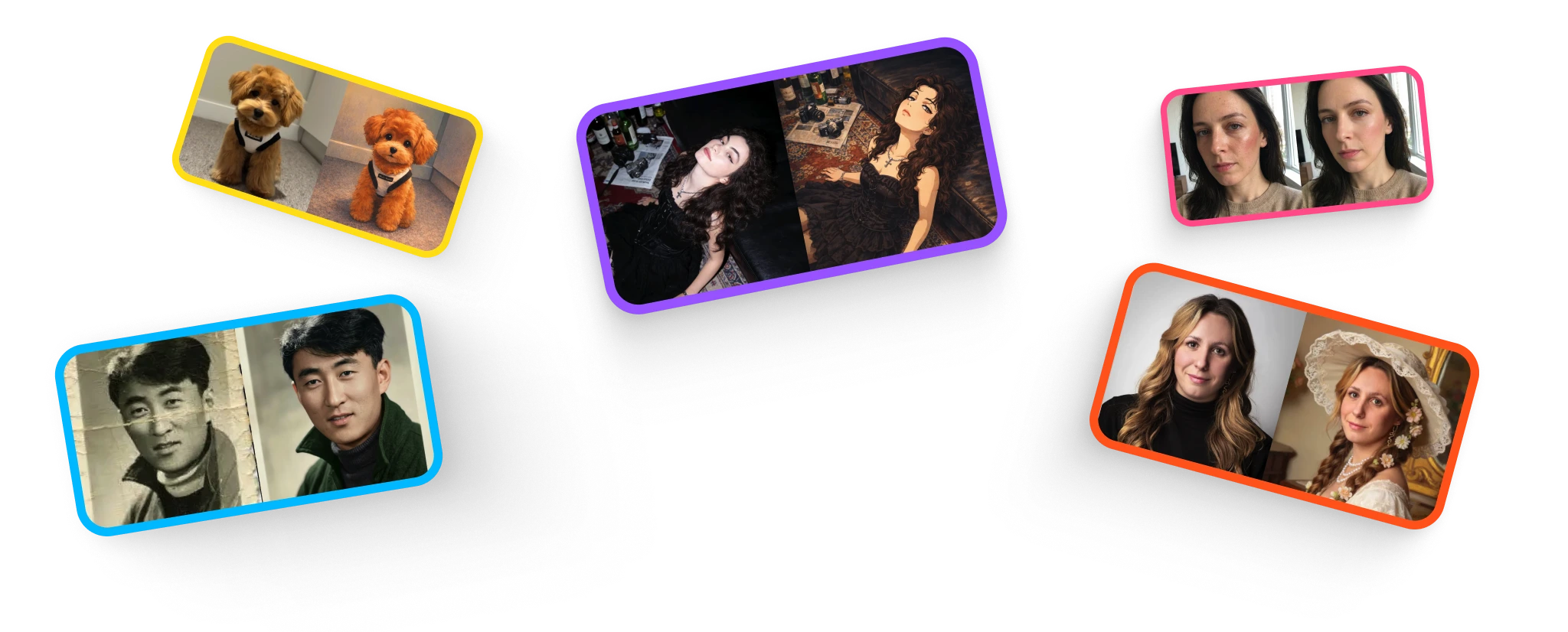

Check Creases Near Faces
A crease crossing a face can hide information the model cannot verify. Compare the eyes, mouth, nose, and expression before accepting the repair.

Review Faded Tones
Check whether the result retains useful contrast without clipping light or dark areas. New colors are interpretations unless you have a reliable color reference.
Restore a Photo and Review the Changes
Keep the source, process a copy, and check before sharing.
Scan and Upload
Keep a digital preservation copy. Upload one JPG, PNG, or WebP image up to 10 MB, with permission from the people or rights holders involved.
Choose the Aspect Ratio
Choose an aspect ratio and let the automatic restoration run. There is no separate restoration preset, damage brush, or strength control in this tool.
Inspect and Save
Compare the result with the source before downloading. Check the saved dimensions before printing; keep both files rather than replacing the original.
For portraits, check facial likeness after restoration before keeping the result.
What to Check in a Restored Photo
A cleaner-looking image still needs an authenticity check.
Scratches and Cracks
Inspect repaired areas for repeated patterns, smears, and misplaced edges. Local manual repair may be preferable where an automatic edit changes important details.
Faded Color
Distinguish recovering contrast from guessing colors. Clothing, skin, and background colors should be checked against any surviving references.
Facial Likeness
Compare identifying features and apparent age. Sharper eyes or smoother skin do not prove that missing original detail has been recovered.
Stains and Missing Areas
Large stains and missing regions give the model little evidence. For a damaged physical original, seek appropriate conservation help; a digital edit does not repair the print.
Choose the plan that fits how you create
Choose credits for restoration, portraits, retouching, illustration, and upscaling. Free access has usage limits.
Start with a one-time purchase
One-time universal credit packs
Use the same credits across every feature. Choose a pack once and spend credits whenever you need them.
One payment · No auto-renewal · Credits never expire
Starter
700 credits$9For example: about 70 Nano Banana 2 edits OR 35 GPT Image 2 edits.
Examples only. Credits work across all tools; usage varies by feature and model.
Creato
2,000 credits$21.99For example: about 200 Nano Banana 2 edits OR 100 GPT Image 2 edits.
Examples only. Credits work across all tools; usage varies by feature and model.
Pro
5,000 credits$48.99For example: about 500 Nano Banana 2 edits OR 250 GPT Image 2 edits.
Examples only. Credits work across all tools; usage varies by feature and model.
For regular use
Monthly credits. Renews automatically until canceled.
For trying things out and light edits.
- No watermarks
- Review usage rights for your project
- Failed generations are not charged
800 credits
For example: about 80 Nano Banana 2 edits OR 40 GPT Image 2 edits.
Examples only. Credits work across all tools; usage varies by feature and model.
- All AI photo editing tools
- HD downloads
Cancel anytime
For creators who edit every week.
- No watermarks
- Review usage rights for your project
- Failed generations are not charged
2,000 credits
For example: about 200 Nano Banana 2 edits OR 100 GPT Image 2 edits.
Examples only. Credits work across all tools; usage varies by feature and model.
- Everything in Starter
- Top-up packs 10% off
- Priority email support
Cancel anytime
For heavy AI usage and client work.
- No watermarks
- Review usage rights for your project
- Failed generations are not charged
4,000 credits
For example: about 400 Nano Banana 2 edits OR 200 GPT Image 2 edits.
Examples only. Credits work across all tools; usage varies by feature and model.
- Everything in Pro
- Top-up packs 20% off
- Early access to new AI tools
Cancel anytime
Sign up to claim free credits
Claim 30 welcome credits; daily claims up to 10, within the free balance cap
Frequently asked questions
Payment via Creem · Contact support about purchase and refund questions
Frequently Asked Questions
Everything you need to know.
Blog & Tutorials
Discover tips, tricks, and deep-dives into AI image generation. Master your workflow with our latest guides.

